AccuCount Barcode
This topic is intended for Independent pharmacies only and is not applicable to Rexall pharmacies.
McKesson Canada's AccuCount counting technology includes a RxCheck function that verifies and confirms dispensing of the correct medication to the correct patient. A barcode representing the DIN must be printed to use this feature. In Propel Rx, a preference can be enabled to print a DIN barcode on the fourth auxiliary label for Half labels or on the side of the Vial label for Thermal labels.
To print an AccuCount barcode for RxCheck:
-
Select More (...) > Pharmacy.
-
Select the Rx Detail tab.
-
Select the Label Preferences button
 beside the Label Type field. The Label Preferences window opens for the corresponding label set (Half Label Preferences or Thermal Label Preferences).
 -
Select the Print Accucount Barcode checkbox.
 Half Label Preferences
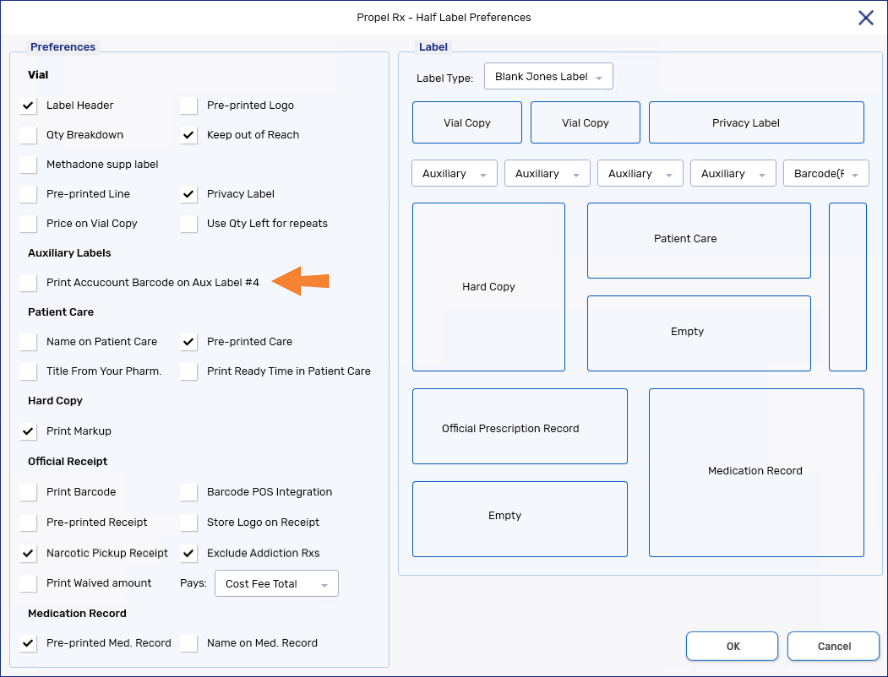
The barcode will print on the fourth auxiliary label. If the Drug Folder is set up with a retail packager, the Print Accucount Barcode on Aux Label #4 preference will be overridden, and a prescription number barcode will print instead on the fourth auxiliary label.
Thermal Label Preferences
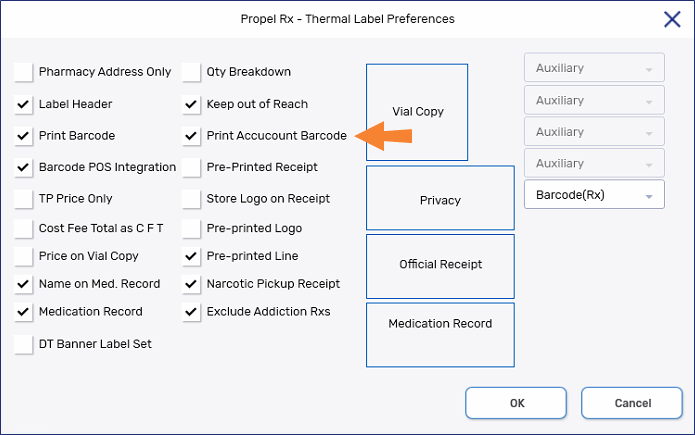
The barcode will print on the side of the Vial label.
-
Select OK.
-
Select Save. The change will take effect once PHS (for half labels) or CPS (for Thermal labels) is restarted.